
If your KiwiSim eSIM installed fine but you've landed and nothing loads without Wi-Fi, you're almost there. Installing the eSIM is only half the job. Your phone also needs to be told to use it, and in nearly every case we see, one of two settings has been missed.
Why this happens
Your phone now has two SIMs in it: your normal New Zealand SIM and your KiwiSim eSIM. It won't automatically switch to the new one. Unless you tell it otherwise, it keeps using your New Zealand SIM for data, which either doesn't work overseas or quietly charges you roaming.
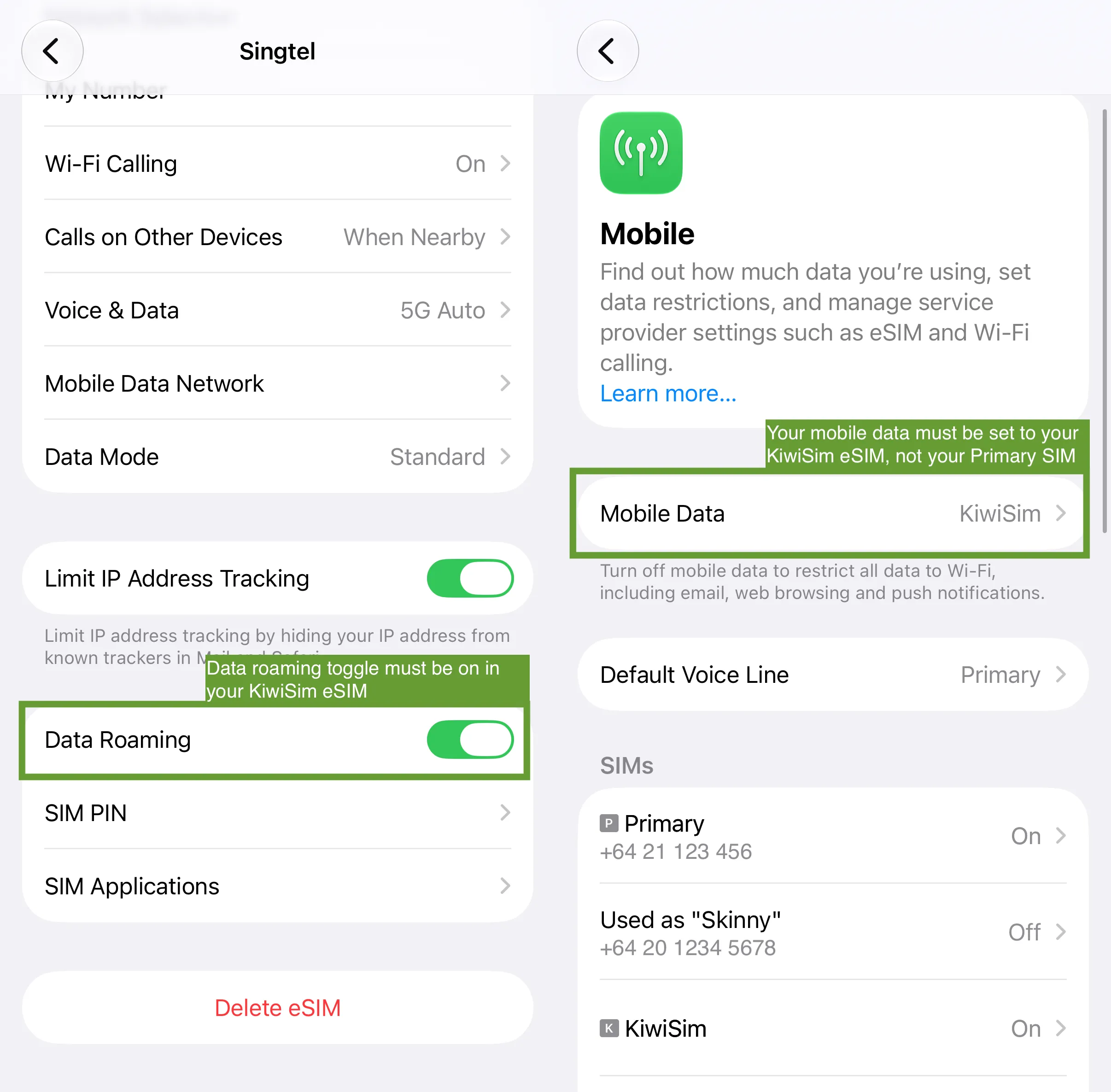
There are two settings that make your phone use the KiwiSim eSIM instead. The first is Data Roaming, which needs to be turned on for the KiwiSim eSIM. It's off by default, and without it the eSIM can't connect to the local network at all. The second is Mobile Data, which tells your phone which SIM to use for internet. This needs to be set to the KiwiSim eSIM, not your New Zealand one.
Miss either of those and the eSIM sits there installed and switched on, but your phone never actually uses it.
How to fix it
You'll need to be at your destination for this to work, as the eSIM can only connect once it's in range of the local network.
- Open Settings and tap Mobile Service. On some iPhones this is called Mobile Data or Cellular.
- Under SIMs, tap your KiwiSim eSIM. It won't be called "KiwiSim" unless you named it. It's the one without your phone number under it.
- Make sure Turn On This Line is on.
- Turn on Data Roaming. This is the step most people miss.
- Go back to the previous screen and tap Mobile Data at the top. Select your KiwiSim eSIM.
- Restart your iPhone by holding the side button and the volume up button together, then sliding to power off.
- Once it's back on, turn Wi-Fi off and open a website to test it.
The network name at the top of your screen won't say KiwiSim either. You'll see the name of the local network we partner with in the country you're in. That's normal.
While you're in those settings, it's worth turning your New Zealand SIM off completely so your home provider can't charge you roaming. Tap it in the SIMs list and switch off Turn On This Line. You can still use WhatsApp, Messenger, and FaceTime over your KiwiSim data.
On Android, the same settings live under Settings → Connections → SIM Manager.
Still not working?
If both settings are correct and you've restarted, try turning Airplane Mode on for a minute and then off again. That forces your phone to reconnect to the network. If that doesn't help, get in touch through the live chat on our website and send us a screenshot of your SIMs list and your KiwiSim eSIM settings. We'll check from our side whether the eSIM has connected to the network and go from there.